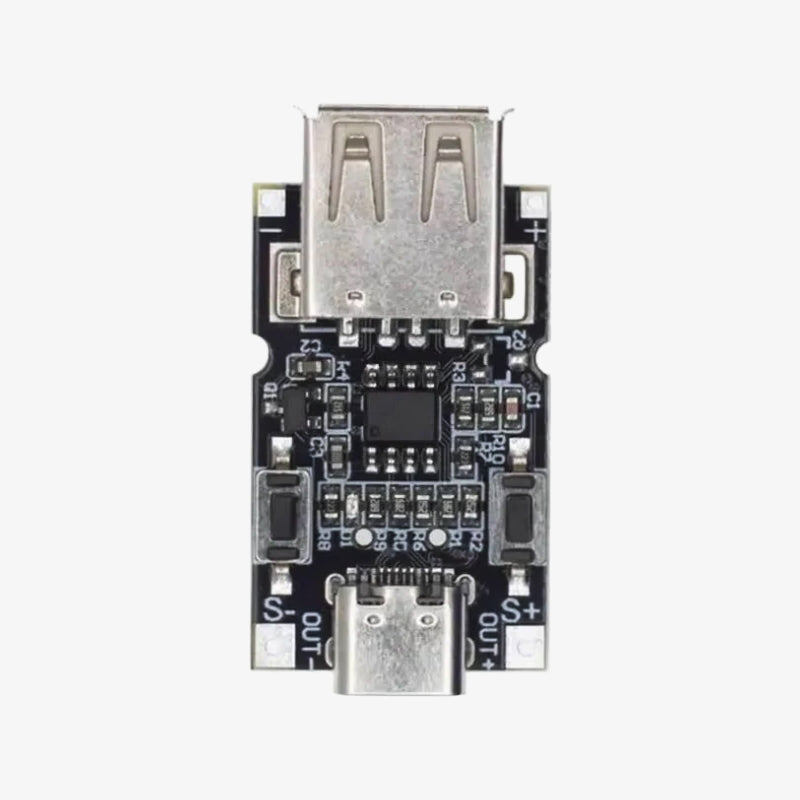
QC2.0/3.0 Decoy Module Boost Trigger Motherboard USB Input 9V 12V 20V Adjustable Power Supply
Regular price
Rs. 225.00
Regular price
Sale price
Rs. 225.00
Taxes included.
Shipping calculated at checkout.
Quantity
Couldn't load pickup availability
- Dispatched in 24 hrsExcept Sundays and public holidays
- GST invoiceInput tax credit for businesses
- ReplacementFor transit damage or wrong item
🎟️ Available Coupons — Copy & Apply at Checkout
IHCPRIME
₹100 off on orders above ₹2999
WELCOME
₹50 off for new customers above ₹999
P42A10
10% off on Molicel P42 MOQ100
FREESHIPPING
Free shipping above ₹1999
100% Secure Payments
Verified & Protected
Accepted Payments
UPI
Mastercard
VISA
SSL Encrypted
256-bit Encryption
- Product name: PD2.0/3.0 decoy
- Input voltage: DC 5V
- Output voltage: 5V>9V>12V>15V>20V
- Maximum output voltage: 20v
- Maximum output current: 5A
- Working temperature: -25 ℃ ~ 85 ℃
- Working humidity: 5% ~ 95% RH
This is USB Input QC2.0/3.0 Decoy Module Boost Trigger Motherboard 9V 12V 20V Adjustable Power Supply. It’s a module used in electronic setups to manage power supplies, particularly in devices that require specific voltage and power delivery.
Instructions for use (need to use PD protocol power supply):
- Hold the S button and insert the module into the power supply, then reset it to 5V output (“>>” means power on).
- Press and hold the S button, then insert the module into the power source. At this time, switch whether the key lock is on or not, and save the state after power-on. If the key lock is unlocked. To prevent accidental operation, the lock must be unlocked to adjust the voltage after the power is on.
- Once powered on, press and hold the button. Once the button is locked, press the button to unlock it.
- After powering on, press and hold the button, then press the button to lock the button.
- Quick Start: Connect the board to PD power. At this time, the LED light will indicate the currently set decoy voltage. If not turned on, it will default to 5v. Adjust the output voltage. The board is locked by default and must be unlocked first. This method involves holding down the s button and then pressing the s button. At this point, the unlock is complete and you can release the button. Click the [s button] to increase the voltage, or the [s button] to decrease the voltage.
Shipping & Returns
Shipping & Returns
- Shipping Time:- Our orders are shipped within 24 Hours.
- Delivery Time:- 2-5 Days (Anywhere in India), 7-10 Days for remote location
- Shipping Partner:- Bluedart, Delhivery, Xpressbees, & India Post.
- Replacement:- Damaged During Transit, Missing Parts Or Item Mismatch.
- Return:- Item mismatch or parts missing etc.
- No return/Replacement will apply if the Product has been subject to misuse, static discharge, neglect, accident, modification, or has been soldered or altered in any way.
- We accept no responsibility for improper installation of our products. Electrical polarity must be properly observed in hooking up electrical components.

QC2.0/3.0 Decoy Module Boost Trigger Motherboard USB Input 9V 12V 20V Adjustable Power Supply
Rs. 225.00